
Download Zeit AI – Efficient Data Insights, AI‑Powered Data Analysis, Secure Online Tool
Overview
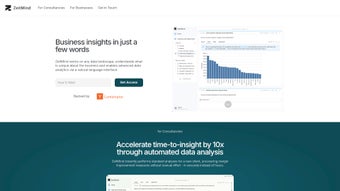
In today’s data‑driven world, turning raw files into actionable insights can feel like decoding a foreign language. Zeit AI eliminates that friction by offering a web‑based platform that reads Excel, CSV, and PDF documents, then instantly transforms them into an interactive online database. The moment you drag and drop a file, the system parses the content, builds a structured schema, and presents a dashboard packed with statistics, previews, filters, and aggregations.
What truly sets Zeit AI apart is its natural‑language chat interface: you type a question just as you would ask a colleague—“What were the top‑selling products last quarter?”—and the AI translates it into a precise query against the newly created database. This means you can bypass complex SQL syntax or tedious spreadsheet formulas entirely. Security is baked in from day one; the platform complies with GDPR, encrypts data in transit, and enforces strict access controls, so you can trust that your confidential business information stays private.
Whether you’re a small‑business owner juggling sales reports, a marketer analyzing campaign performance, or a data analyst looking for a quick prototype environment, Zeit AI delivers a seamless, code‑free experience that accelerates insight generation without sacrificing compliance or accuracy.
Core Features and Capabilities
- Multi‑format ingestion: Upload Excel, CSV, or PDF files via drag‑and‑drop or connect directly to relational databases.
- Automatic schema generation: The engine detects data types, creates tables, and establishes relationships without manual mapping.
- Interactive dashboard: Real‑time previews, statistical summaries, and visual filters let you explore data instantly.
- Natural‑language chat query: Ask questions in plain English; Zeit AI converts them into SQL‑like queries and returns results instantly.
- Data privacy & GDPR compliance: End‑to‑end encryption, role‑based access, and automatic data‑retention policies keep information secure.
- Export & integration: Download query results as CSV/Excel, or push them to BI tools via webhooks and API endpoints.
- Version control & audit trail: Every upload and query is logged, enabling traceability for compliance audits.
- Collaboration workspace: Share a read‑only link with teammates, allowing simultaneous exploration without exposing raw files.
Each feature is designed with a specific user pain point in mind. Multi‑format ingestion removes the need for tedious file conversion, while automatic schema generation frees non‑technical users from database design. The interactive dashboard provides immediate visual feedback, turning abstract numbers into understandable patterns.
Perhaps the most compelling element is the chat query engine, which leverages large language models to understand intent, disambiguate ambiguous terms, and suggest follow‑up questions, creating a conversational analytics experience. Security features meet enterprise standards, making Zeit AI suitable for regulated industries such as finance, healthcare, and education. Finally, export and integration capabilities ensure that the platform can sit comfortably within existing data pipelines, allowing you to move from insight to action without data silos.
Installation, Setup, and Compatibility
Because Zeit AI is a fully hosted web application, there is no traditional “installation” process. Getting started is as simple as navigating to the official website, creating a free account, and confirming your email address. Once logged in, you are presented with a clean workspace where you can immediately begin uploading files.
The drag‑and‑drop zone accepts files up to 500 MB each, and the platform automatically detects the file type. For users who need to pull data directly from a database, Zeit AI offers a secure connector that supports MySQL, PostgreSQL, and Microsoft SQL Server. You simply provide the connection string, credentials, and select the tables you wish to import; the system will then mirror the selected schema into its online environment.
Operating System Compatibility (itemprop="operatingSystem"): Since the interface runs in a browser, Zeit AI works on any modern operating system—Windows 10/11, macOS Monterey and later, Linux distributions with a supported browser, as well as mobile platforms such as Android 12+ and iOS 14+. Recommended browsers include Chrome, Edge, Firefox, and Safari (latest versions). The platform is fully responsive, ensuring a consistent experience whether you are on a desktop, tablet, or smartphone.
After the first upload, Zeit AI walks you through a short “data wizard” that confirms column headers, data types, and any required cleaning steps (e.g., removing duplicate rows or handling missing values). Once the wizard is complete, the system builds the online database and displays a summary panel with key statistics—row counts, column distributions, and data quality scores. From there, you can start asking questions through the chat window, generate visualizations, or share a link with collaborators. Updates to your data are handled gracefully: simply drop a new version of the file into the same workspace, and Zeit AI will version the dataset, preserving the original for audit purposes while refreshing the analytics view.
Pros, Cons, and Real‑World Use Cases
Pros
- Zero‑code analytics – natural‑language queries eliminate the need for SQL knowledge.
- Supports a wide range of file formats and direct database connections.
- GDPR‑compliant security model with encryption and role‑based access.
- Instant schema generation and interactive dashboards accelerate insight discovery.
- Cross‑platform accessibility via any modern web browser.
- Free tier available for small projects; paid plans include higher file limits and enterprise SLAs.
Cons
- Dependent on internet connectivity; offline analysis is not possible.
- Large datasets (>500 MB) require a paid plan or manual chunking.
- Advanced data modeling (e.g., complex joins across many tables) may need manual SQL for fine‑tuned results.
- Customization of visual themes is limited in the free version.
- Current integrations are focused on major BI tools; niche platforms may need custom API work.
Real‑World Use Cases: A retail manager can upload monthly sales reports in CSV format, then ask “Which product categories grew the most in the last six months?” and receive an instant bar chart with actionable recommendations. A marketing analyst can drag a PDF of campaign performance metrics, query “What was the average click‑through rate by channel?” and instantly compare it against historical benchmarks. In the healthcare sector, a compliance officer can securely upload patient outcome data, ask “How many cases met the readmission criteria last quarter?” and obtain a GDPR‑safe report that can be shared with senior leadership without exposing raw identifiers. Across all scenarios, Zeit AI reduces the time from data receipt to insight delivery from days to minutes.
Review Summary: Zeit AI offers a powerful blend of AI‑driven natural language querying and robust data security, making it an excellent choice for professionals who need fast, code‑free insights. While the reliance on internet access and limits on very large files are minor drawbacks, the overall value—especially for teams seeking collaborative, compliant analytics—justifies the subscription for most medium‑sized businesses.
Frequently Asked Questions
Is Zeit AI really free to use?
Zeit AI offers a free tier that allows you to upload files up to 500 MB, access the chat query interface, and share read‑only links with teammates. For larger files, more storage, or advanced enterprise features like SSO and audit logs, paid plans start at $29 per month.
How does Zeit AI ensure my data is secure?
The platform is GDPR‑compliant, uses TLS 1.3 encryption for data in transit, and encrypts data at rest with AES‑256. Access is controlled through role‑based permissions, and all actions are logged for auditability.
Can I connect Zeit AI to my existing SQL database?
Yes. Zeit AI provides secure connectors for MySQL, PostgreSQL, and Microsoft SQL Server. You simply supply the connection string and credentials, and the platform will import the selected tables into its online workspace.
What types of questions can the chat interface handle?
The chat engine understands a wide range of natural‑language queries, including aggregation (sum, average), filtering (by date, category), ranking (top‑N), and simple joins across tables. For more complex analytical needs, you can still export the underlying SQL and modify it manually.
Is there an API for developers who want to automate uploads?
Zeit AI offers a RESTful API that lets you programmatically upload files, trigger schema generation, and retrieve query results. Documentation and API keys are available in the user dashboard under the “Developers” section.
Conclusion & Call to Action
If you’re looking for a fast, secure, and code‑free way to turn messy spreadsheets or PDFs into actionable insights, Zeit AI delivers exactly that. Its blend of AI‑driven natural language querying, robust security, and cross‑platform accessibility makes it a standout choice for businesses of all sizes. Ready to experience data analysis without the usual headaches? Download Zeit AI now, start your free trial, and see how quickly you can move from raw data to informed decisions.






